Normally you would enter your Virtual Center server host name when logging in with the Virtual Machine MKS Client. But in some circumstances it may be necessary to logon to your ESX server directly. Bypassing the Virtual Center is never a good idea because you can make your cluster instable, but on the other hand if you don’t have a Virtual Center Server anymore and still want to use the Virtual Machine MKS Client you received an error. Until now, with version 1.8 you can both logon to your VC server and directly to your ESX host. Keep in mind that when you logon to the ESX server directly you have to use the service console Linux account instead of your Windows account. When you want to visit the Paypal sponsor page, please use this link. You can find the download link for the Virtual Machine MKS Client v1.8 in the software menu item of my blog.
Friday, 27 July 2007
Virtual Machine MKS Client v1.8
Thursday, 26 July 2007
Virtual Machine MKS Client v1.7

Another new version of the Virtual Machine MKS Client is released. This new version contains a link which can be used to become a sponsor. Why is sponsorship important ? When you become a sponsor I have the opportunity to add new functions and fix bugs. This way we can keep the quality of the Virtual Machine MKS Client at a high level. When you want to visit the Paypal sponsor page, please use this link. You can find the download link for the Virtual Machine MKS Client v1.7 in the software menu item of my blog.
Wednesday, 25 July 2007
Virtual Machine MKS Client v1.6
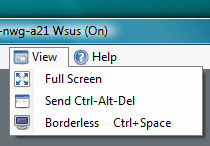
Today I added two new features to the Virtual Machine MKS Client. Richard suggested to ad a menu item to send Ctrl+Alt+Delete to the virtual machine and Philippe would be very happy with a borderless window mode. Their wishes are my command and in the 1.6 version you can find both menu items under View. Just some figures, the Virtual machine MKS Client is downloaded over 600 times and the internal version is 1.0.0.11. On an average day my blog is visited by more than 800 people. You can find the download link for the Virtual Machine MKS Client v1.6 in the software menu item of my blog.
Tuesday, 24 July 2007
Virtual Machine MKS Client v1.5
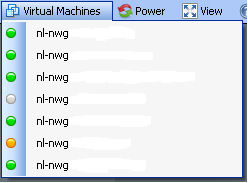
I added another really cool feature to the Virtual Machine MKS Client. When you click on the menu item Virtual Machines you will see a list of all your virtual machines. On the left of the virtual machine you see a little bullet. This bullet is an indicator of the overall status of the virtual machine. When the bullet is green there is nothing wrong. When it’s grey the virtual machine is powered down. When it’s red there is an alarm and when it’s yellow there is a warning.You can find the download link for the Virtual Machine MKS Client v1.5 in the software menu item of my blog.
vmware-mks.cab workaround

When you are running the Virtual Machine MKS Client on a system that never visited Web Access than the MKS Client won’t start. This problem is caused by the absence of the ActiveX Control that is used by the MKS Client. I created a workaround for this problem. Download vmware-mks.cab, unpack the files, right click the quickmksax.inf and choose install. After this short procedure the Virtual Machine MKS Client will function correctly.
Monday, 23 July 2007
The capacity sizing and planning solutions matrix
Peter van den Bosch over at PQR has created a nice PDF document. The Virtualization capacity sizing and planning solutions feature comparison matrix. This matrix compares the features of the industry’s most popular virtualization sizing and planning products.
Virtual Machine MKS Client v1.4
I installed the Virtual Machine MKS Client on a Workstation where the VMware Virtual Infrastructure Client 2.0 wasn’t installed yet and the Virtual Machine MKS Client didn’t work. I still have to find out what’s causing this behavior. I received some real good feedback and was able to implement some of the feature requests. In this new version I added some icons and I fixed a few typo’s. You can find the download link for the Virtual Machine MKS Client v1.4 in the software menu item of my blog.
Saturday, 21 July 2007
Virtual Machine MKS Client v1.3
I fixed a major bug, this bug was responsible for randomly black screens when connecting to a VM. I also added an extra menu item. This new menu item is called Full Screen. When you select it you will see the VM console in Full Screen mode. Don’t forget to press CTRL+ALT to return.

You can find the download link for the Virtual Machine MKS Client v1.3 in the software menu item of my blog.
Friday, 20 July 2007
Virtual Machine MKS Client v1.2
First of all I would like to thank Robert Baumstark. He is the one who has build the VIClient.dll and helped me tremendously. I created a new version of the Virtual Machine MKS Client, this version has better sizing, very handy when working on a small desktop with large virtual machines. Another new thing is the title bar, it displays the status and name of the controlled virtual machine. You can download the new version here.

Then about the contest, Richard Garthagen joined in so we can expect a MKS tool on run-virtual this summer. Bouke Groenescheij was behaving very strange yesterday. He wouldn’t talk to me and suddenly claimed a new domain name and made an announcement about vvi-world ? I suspect someone has put something in his tea here at Ahrend
. I took a peek at his KVM-Tool and it’s impressive. His tool allows you to open multiple console sessions and logs on to an ESX server directly.
What to expect in the future, well I like the multiple screen option so I’m going to build a tear off button. Besides that Dee made a comment and suggested to allow the virtual machine to be connected to the local CD drive on the client. Any other suggestions are welcome.
Wednesday, 18 July 2007
ESX Manager 2.1 released by ESXGuide
Manfred Meier over at ESXGuide has released a new version of the ESX Manager 2.1. The features are :
Virtual Center independent
Keeps track of Virtual Machine Host Registration, Migrations and Status
Manage Virtual Machine Configuration
Display and work in the Virtual Machine Console
Kill Virtual Machine Process (if the VM can't be powered off)
Rename Virtual Disks of registered Virtual Machines
Move Virtual Disks and keep the disk attached to the Virtual Machine
Virtual Machine Registration, Start , Restart , Reset, Power Off, Suspend
Extend Virtual Disks
View-Search-Filter Logfiles on the ESX Host.
Define and save custom SSH commands with Parameter handling
Publish and share custom SSH commands with other ESX Administrators
Tuesday, 17 July 2007
Virtual Machine MKS Client v1.1
The games have begun. Bouke and I are in sort of a contest who will build the most fancy Virtual Machine MKS Client. Bouke calls his creation the KVM-Tool, my application goes under the name VMware MKS Client. So it’s the KVM-Tool versus the Virtual Machine MKS Client from now on. No more code sharing and no more walks during lunch breaks
. I don’t know when Bouke is going to deliver his first beta version because we are only communicating through our weblog posts from now on
. What I do know is that my beta version is ready. You can download it here. Have fun with it.
Monday, 16 July 2007
VMware MKS client (step four)
Friday, 13 July 2007
VMware MKS client (step three)
Thursday, 12 July 2007
VMware MKS client (step two)
A few weeks ago I started building a VMware MKS client with an integrated VM console. I got stranded at the point that I was staring at a black screen until Bouke Groenescheij showed up. We have teamed up for a few moths and are working together at Ahrend IT-Services where we are responsible for the IT infrastructure. On one of those rainy afternoons you often have during the Dutch summer season I showed Bouke my progress on the MKS client. After a few minutes I lost control over my real keyboard and mouse and Bouke took over. He started with some real serious hacking and showed me the ropes of Java script. This eventually resulted in some late hours of coding but we did it. Finally there is a working piece of Java script that functions as a MKS connection to the VM. The next step is embed this code into a nice looking user interface. I think this is going to be a hot summer after all.