 Virtual Rob has released the source code for the VIClient.DLL that was included with his Virtual MAC tool. The download links can all be found @ his new blog: http://virtual-rob.blogspot.com/. Using the regular SDK from VB (or any other .NET language) isn't that hard. The hard part is getting all the references in place and stub DLLs built.So Rob has updated his blog with instructions on how to do just that. And if you're still having problems, he included compiled versions of the stub DLLs. He has also cleaned up the code and released an updated version of his VIClient.DLL, as well as its full source code. Right now I guess thats about the closest thing there is to a VI VB Toolkit - though it would work equally well from any .NET language.
Saturday, April 28. 2007
Virtual Rob has released the source code
Thursday, April 26. 2007
TSX 2007 presentations online
 The VMware presentations delivered at TSX 2007 in Nice are available online for you to download. You can find the presentations on the TSX website. VMware is also still collecting the Solution Partner presentations and they will be posted soon on the same page.
Virtual-Rob went live

On Wednesday, April 25, 2007 something great has happened. Robert Baumstark, the creator of the virtual MAC tool has opened his Virtual Rob weblog. Rob is an infrastructure specialist at the Northern Alberta Institute of Technology in
Tuesday, April 24. 2007
Building VMware Visual Basic Applications
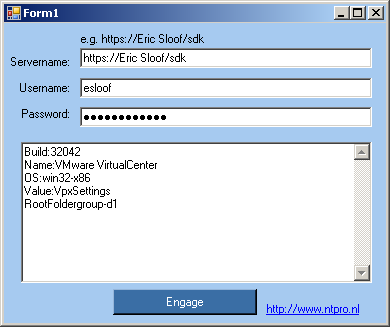
This document describes how to build a VB Application that can communicate with
On April the 25th I received some additional information from Robert Baumstark and my wife corrected the grammar in the PDF document.
Bellow you can find the email message from Rob with some extra tips about using the VIClient.dll.
Continue reading "Building VMware Visual Basic Applications" »Yippie!!
 I am a huge fan of the website run-virtual.com, on November the 16th 2006 Richard Garsthagen yelled Yippie!! in one of his posts and that was for a reason. Richard was able to talk to VirtualCenter via SOAP with his own Visual Basic application. On November the 21th he published his first application with the name VmotionInfo. That was the eye opener for me. I immediately visited the vmware.com website to get my hands on as much SDK info as possible. Unfortunately the VB example folder was empty. During the next months I was struggling with C# and Googeling like crazy but my VB application could not communicate with VirtualCenter. In the beginning of April 2007 I attended the TSX in Nice and got up early to visit the VI3 Perl SDK lab hosted by Jeremy van Doorn. Afterwards I interviewed Jeremy and asked him if VMware is going to release the SDK examples for Visual Basic. His answer was that it will be released this year ? This year I thought? I want to start writing my apps right now. This week I had a breakthrough. I only slept for a few hours last night but it paid off. My Visual Basic application is communicating with Virtual Center and “logging onâ€? takes an eye blink. Yippie!!! I only have till Friday to work on my first app because after next weekend I am delivering the VI3 Install and Configure training in The Hague and Eindhoven. So I have decided that I am going to share my invention. I am going to write a complete “how toâ€? and will publish all the source code and VB project files on my website www.ntpro.nl. Stay tuned.
Friday, April 20. 2007
VMware symposium Antwerp
 Today, virtualization is in the forefront - helping businesses with scalability, security and management of their IT infrastructure. VMware is pleased to invite you to join them on Tuesday 12 June at VMware Symposia 2007, an exclusive one-day event designed to stimulate the exchange of viewpoints and strategies among industry experts and leaders who are harnessing the power of virtualization. You can find more info on the VMware Symposia website.
Location : FCCC - Elisabethzaal, Koningin Astridplein 26, 2018 Antwerpen, Belgium